Foldic for Mac and Foldic for iPhone were both submitted today, rebuilt as native Swift. The part that decides what happens to your photos is the same code it was yesterday.
Six versions on a webview
Until today, Foldic's interface was a web page inside a window. That is not a confession — it shipped six versions that way, scanned real libraries, and did its job. But every album row was a document being re-rendered, and the parts of the system an app like this lives on — the menu bar, a window that remembers itself, the photo library — could only be reached through a bridge we wrote and maintained ourselves, one call at a time.
It worked. "Works" is not the bar we want to clear.
What native feels like
The interface is SwiftUI now, drawn by macOS and by iOS themselves. Most of the difference is not a feature you can list — it is a hundred small things that stop being almost right. Lists scroll the way the system's own lists scroll. The window remembers where you left it. Switching languages applies on the spot. The app opens in a blink, because there is no page to load.
And some of it is a feature. On the Mac, Foldic now lives in the menu bar: close the window and a running backup keeps going, the icon turning until it is done. A web page in a window cannot do that. This rewrite happened so that things like that stop being impossible.
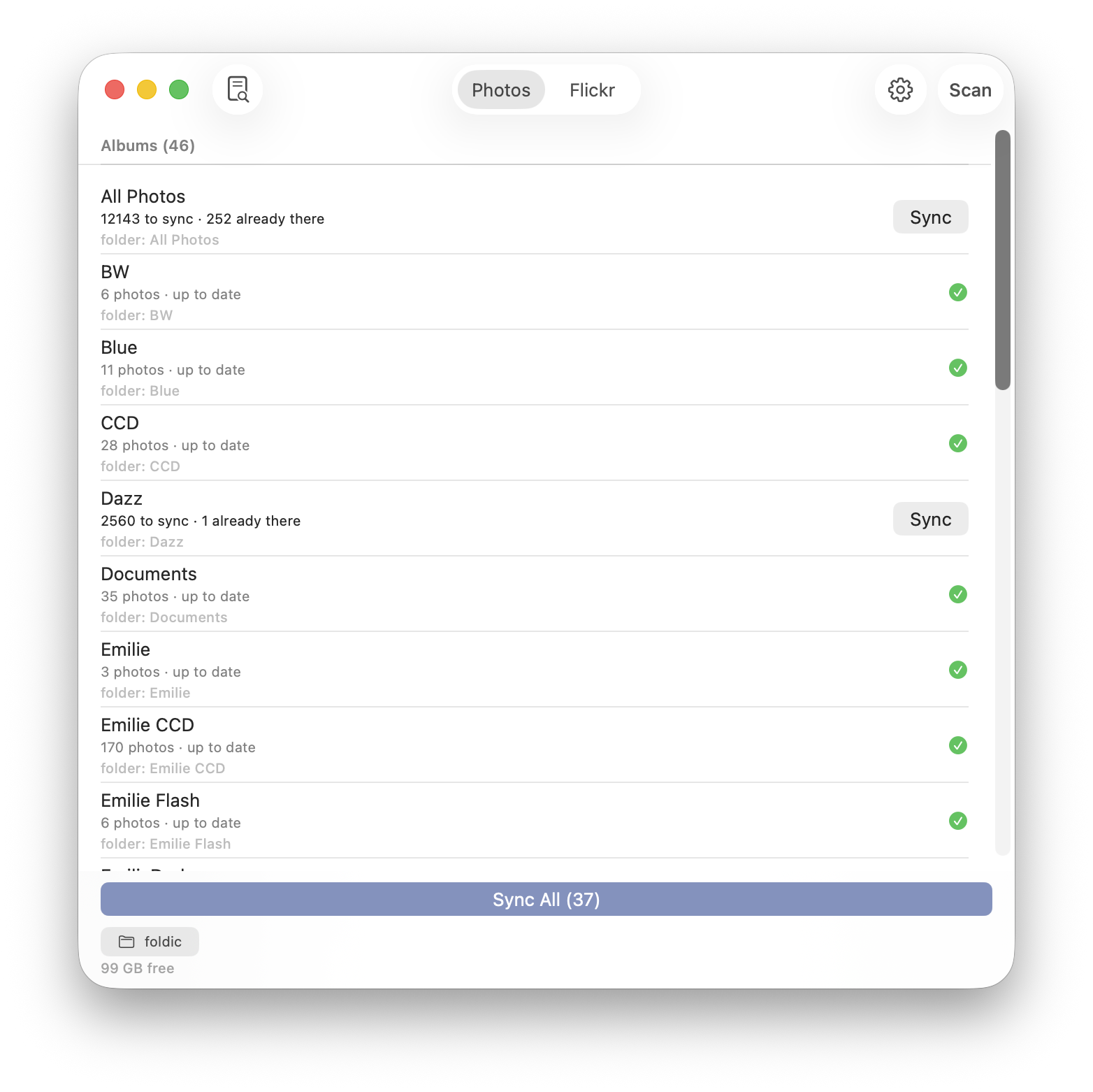
The Mac app after the rewrite — the album list is the system's own, down to the scrollbar.
How Swift talks to Rust
The two languages are closer than they look. The engine compiles to a plain library — one for the Mac, one for the iPhone — that gets baked into the app the way any system library would be. On top of it, a tool called UniFFI reads the engine's interface and writes the Swift side of it for us. From SwiftUI's point of view there is no seam: calling the engine is calling a Swift function, in the same process, at function-call speed. No server, no messages, nothing serialized.
The interesting part is not the plumbing but the discipline about what crosses it. Rust answers questions: which photos still need copying, what this file should be named, whether two folders overlap. Swift owns everything that belongs to the platform — the photo library, the file pickers, the permissions — and it owns every loop. When a download needs pacing, Rust hands back a number of milliseconds and Swift sleeps a task it can cancel. A cancellation flag never crosses the boundary in either direction. We learned to want that rule the hard way: the one flag that used to cross is the one that once broke every sync.
The half we refused to rewrite
The engine — the part that decides which photos still need copying, what every file is named, which folder belongs to which album — is written in Rust, and it did not change today. That is deliberate. The code that touches your files should be the most boring, most heavily tested code in the app.
Why is that half Rust and not Swift too? Three reasons, in the order they matter. It is the one place where a memory mistake would be aimed at your photos, and Rust removes that class of mistake at the language level rather than by our vigilance. It is the code we most need to test relentlessly — and a dependency-free Rust crate runs its whole test suite in a blink, on any machine, no simulator required. And it had already survived six shipped versions; a rewrite of the interface that also rewrote the engine would have put the trustworthy half at risk to improve the cosmetic one.
It is also the same engine on the Mac and on the iPhone. Both write to the same drive, so both must agree, always, about which files there are yours — and code that exists once cannot disagree with itself.
We rewrote the half you look at precisely so we would never have to rewrite the half you trust.
Update: both versions passed review — 48 hours, no rejections — and are live now. The Mac's 0.7.0 replaces the webview build directly. The iPhone's 0.7.0 jumps over two versions that never made it to the store, so user-triggered scanning, cancellable scans, readable file names, a power-saving screen and an in-app log all arrive at once. Get Foldic on the App Store.
Foldic is free to download with a 7-day full trial. Foldic Pro is $2.99 a month, $29.99 a year or $39.99 once, for Mac and iPhone together.
Foldic의 Mac 버전과 iPhone 버전을 오늘 모두 네이티브 Swift로 다시 만들어 제출했습니다. 사진에 무슨 일이 일어날지 정하는 부분은 어제와 같은 코드입니다.
웹뷰인 채로 여섯 버전
오늘까지 Foldic의 인터페이스는 창 안의 웹 페이지였습니다. 이것은 고백이 아닙니다 — 그 형태로 여섯 개의 버전을 냈고, 실제 라이브러리를 스캔했고, 제 몫을 해냈습니다. 다만 앨범의 한 행 한 행이 다시 렌더링되는 문서였고, 이런 앱이 기대어 사는 시스템의 부품들 — 메뉴 바, 자기 위치를 기억하는 창, 사진 라이브러리 — 에는 우리가 직접 쓰고 직접 유지하는 브리지를 통해서만, 호출 하나씩만 닿을 수 있었습니다.
동작은 했습니다. 하지만 "동작한다"는 우리가 지키고 싶은 기준이 아닙니다.
네이티브의 감촉
인터페이스는 이제 SwiftUI이고, macOS와 iOS가 직접 그립니다. 차이의 대부분은 나열할 수 있는 기능이 아닙니다 — "거의 맞는" 상태였던 백 가지 작은 것들이 더는 그 "거의"가 아니게 되는 것입니다. 목록은 시스템 자신의 목록처럼 스크롤됩니다. 창은 지난번 위치를 기억합니다. 언어 전환은 그 자리에서 적용됩니다. 불러올 페이지가 없으니 앱은 눈 깜짝할 사이에 열립니다.
그리고 기능 그 자체도 있습니다. Mac 버전은 이제 메뉴 바에 상주합니다. 창을 닫아도 진행 중인 백업은 계속되고, 끝날 때까지 아이콘이 돌아갑니다. 창 안의 웹 페이지는 이것을 할 수 없습니다. 이번 재작성은 이런 일들이 더는 불가능이 아니게 하려고 한 것입니다.
다시 쓴 뒤의 Mac 버전 — 앨범 목록은 스크롤 바까지 시스템의 것입니다.
Swift는 Rust와 어떻게 대화하나
이 두 언어는 보기보다 가깝습니다. 엔진은 평범한 라이브러리로 컴파일되어 — Mac용 하나, iPhone용 하나 — 여느 시스템 라이브러리처럼 앱에 구워집니다. 그 위에서 UniFFI라는 도구가 엔진의 인터페이스를 읽고 Swift 쪽 코드를 대신 써 줍니다. SwiftUI에서 보면 이음새가 없습니다. 엔진을 부르는 것은 Swift 함수를 부르는 것이고, 같은 프로세스 안에서, 함수 호출의 속도입니다. 서버도, 메시지도, 직렬화할 것도 없습니다.
흥미로운 것은 배관이 아니라 "무엇이 경계를 넘어도 되는가"라는 규율입니다. Rust는 질문에 답합니다. 어떤 사진이 아직인지, 이 파일의 이름을 무엇으로 할지, 두 폴더가 겹치는지. Swift는 플랫폼에 속한 모든 것 — 사진 라이브러리, 폴더 선택, 권한 — 을 갖고, 모든 루프를 갖습니다. 다운로드에 간격이 필요하면 Rust는 밀리초 수를 돌려주고 Swift는 취소할 수 있는 작업으로 기다립니다. 취소 플래그는 어느 방향으로도 경계를 넘지 않습니다. 이 규칙의 필요성은 수업료를 내고 배웠습니다. 한때 경계를 넘던 유일한 플래그가, 모든 동기화를 망가뜨렸던 바로 그 플래그입니다.
다시 쓰기를 거부한 절반
엔진 — 어떤 사진이 아직 복사되지 않았는지, 각 파일의 이름을 무엇으로 할지, 어떤 앨범이 어떤 폴더에 해당하는지 정하는 부분 — 은 Rust로 쓰여 있고, 오늘도 변하지 않았습니다. 이것은 의도적입니다. 당신의 파일에 닿는 코드는 앱에서 가장 지루하고 가장 철저히 테스트된 코드여야 합니다.
왜 그 절반은 Rust이고 Swift가 아닌가. 이유는 셋, 중요한 순서대로. 첫째, 메모리 실수가 당신의 사진을 향하게 되는 유일한 곳이고, Rust는 그 종류의 실수를 우리의 주의력이 아니라 언어 차원에서 없앱니다. 둘째, 가장 집요하게 테스트해야 하는 코드인데 — 의존성 없는 Rust 크레이트는 전체 테스트가 어떤 머신에서든 눈 깜짝할 사이에 돌고, 시뮬레이터도 필요 없습니다. 셋째, 이미 출시된 여섯 버전을 살아남은 코드이기 때문입니다. 인터페이스를 다시 쓰면서 엔진까지 다시 쓰는 것은, 믿을 수 있는 절반을 위험에 빠뜨려 겉모습의 절반을 좋게 만드는 일입니다.
게다가 Mac과 iPhone이 같은 엔진을 씁니다. 둘 다 같은 드라이브에 쓰는 이상, "거기 있는 어떤 파일이 당신 것인가"에 대해 둘은 언제나 일치해야 합니다 — 한 번만 존재하는 코드는 자기 자신과 어긋날 수 없습니다.
보이는 쪽 절반을 다시 쓴 것은, 당신이 신뢰하는 쪽 절반을 영원히 다시 쓰지 않기 위해서입니다.
업데이트: 두 버전 모두 심사를 통과했고 — 48시간, 리젝트 없음 — 지금 출시되었습니다. Mac의 0.7.0은 웹뷰 빌드를 그대로 대체합니다. iPhone의 0.7.0은 스토어에 나오지 못한 두 버전을 뛰어넘기 때문에, 직접 시작하는 스캔, 취소할 수 있는 스캔, 읽을 수 있는 파일 이름, 절전 화면, 앱 내 로그가 한꺼번에 도착합니다. App Store에서 Foldic 받기.
Foldic은 무료로 내려받아 7일 동안 모든 기능을 써 볼 수 있습니다. Foldic Pro는 월 $2.99, 연 $29.99 또는 한 번에 $39.99이며, Mac과 iPhone 모두에서 사용할 수 있습니다.