Apple's privacy model is strict in a way I am glad about: I cannot reach into your device and look at what happened. So when Foldic gets something wrong, the only way I learn of it is if you tell me — and the real question stops being "how do I collect diagnostics" and becomes "what is a diagnostic report allowed to know about you?"
A log is more personal than it looks
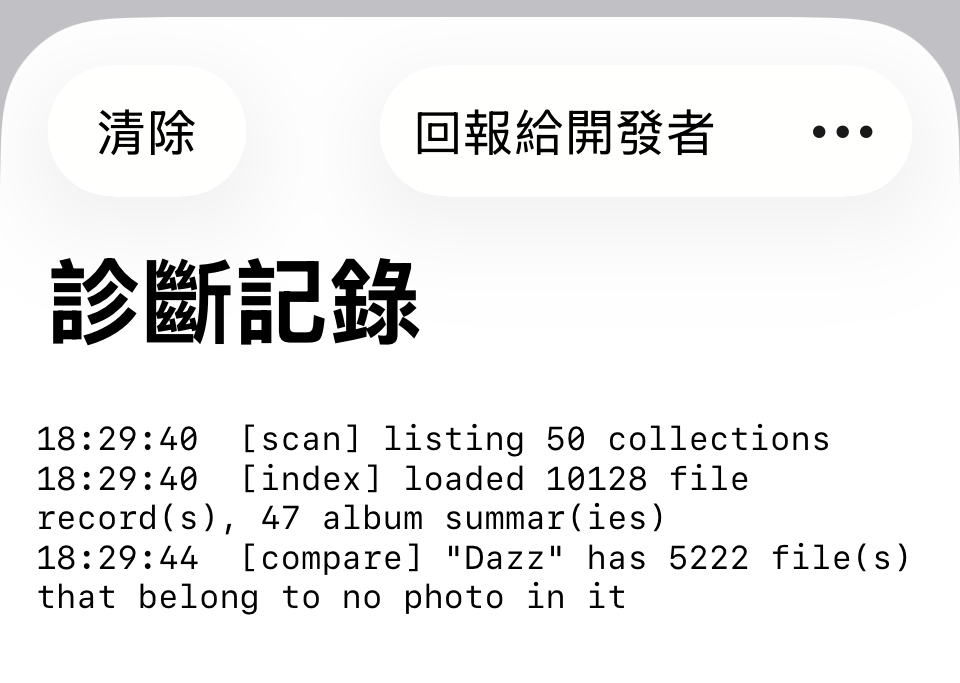
Foldic keeps a plain-text log of what it did: which album it compared, which file it wrote, how long each took, what the filesystem said when something failed. One line is harmless. The whole file is a description of somebody's life — album titles are the names of children, trips, dead relatives, and the file names carry the same. Yet what I actually need is none of that: sizes, durations, error codes, and the order things happened in. The useful half and the private half sit on the same line.
Pseudonyms, not deletion
The obvious move is to strip the names out. I did not, because it would have cost me a bug I have already had to fix: an album title once aborted an entire scan on a customer's Mac, and the title was the bug — 502 bytes, padded with an invisible character to get past a spam filter, longer than the filesystem accepts as a folder name. Delete titles from reports, and that bug becomes unsolvable.
So every name becomes a short token, and a legend at the top of the report records only the shape of what it replaced — how many bytes, whether it was plain ASCII. I get to see that something was 502 bytes and not plain text. I never see what it said.
The token comes from the album's own identifier
My first attempt numbered them album#1, album#2 in order of appearance. That works for one report and breaks across two from the same person: the album that is #3 in the morning is #7 in the afternoon, and I cannot line them up.
Now the token is cut from the identifier Photos already gave the album — album-4C5010FC — stable across reports from the same device. It also covers albums deleted since: the log still mentions them, and Foldic's own record of where a deleted album's folder went is keyed by that same identifier, so even those get a token instead of leaking.
File names keep the identifier and lose the human part: IMG_8136-992A6B204A32.jpg becomes photo-992A6B204A32.jpg. The extension stays, because a HEIC, a MOV and a JPEG fail in different ways.
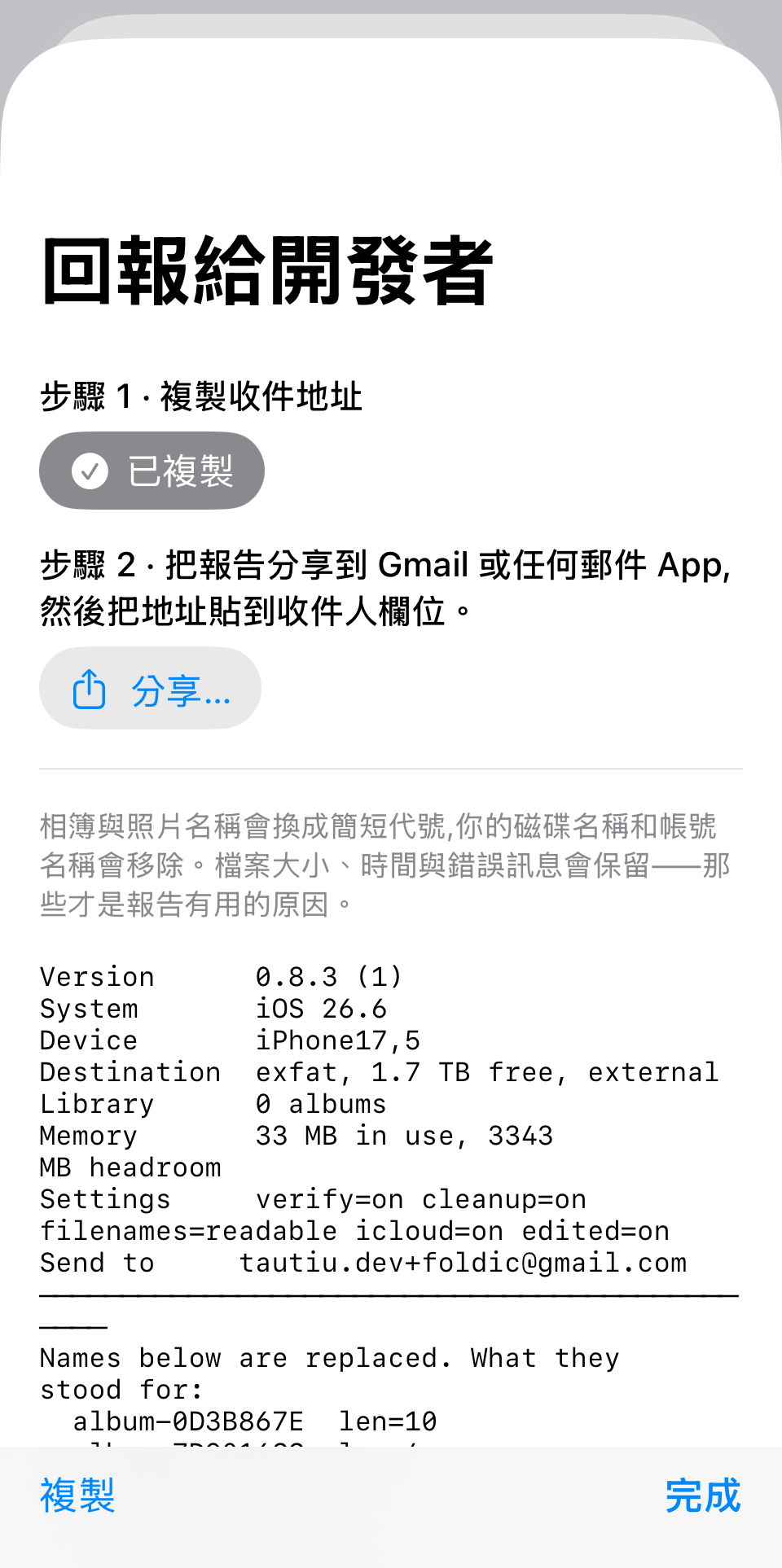
Two numbered steps. The address is copied first because the share sheet can attach the report but cannot fill in a recipient — on any platform.
Two steps, because the order is not guessable
Getting the report to me turned out to be the fiddly part, for a reason that is invisible until you hit it: the share sheet can attach a file but cannot fill in a recipient. Not on iOS, not on macOS, not with any API. And the routes that can fill in an address — mailto:, Gmail's web compose — cannot carry an attachment.
My first version was a row of four buttons, and it was unusable: nothing said which to press or in what order. Now it is two numbered steps. Step one copies the address. Step two shares the report, and says in its own text to paste the address into the To field. That sentence is the whole trick — without it, people share the report and then sit in front of an empty recipient line.
What it does not promise
The redaction is best effort, and the app says so rather than claiming to be complete. Titles are exact, because Foldic knows them — but a title that is a single common word can still match text that was never a title, and a title under two characters is refused as a pattern outright, because it would match half the log.
Which is why the report is shown to you, in full, before it goes anywhere. That is the actual guarantee: a redaction whose result you can read is worth more than one that claims perfection and cannot be checked. And nothing is ever sent automatically, by any path, at any time.
The log the way you see it, with your own album names intact. The report is the redacted version of this.
Privacy first, then experience
The balance this screen tries to strike — enough for me to fix the bug, nothing that describes you — is the balance I want the whole app judged on. And the two turned out not to conflict: the report that tells me least about you is also the one that gets your problem fixed fastest, because the sizes, the timings and the error codes are all still there, readable in one pass.
When can you use this? Report to Developer ships with version 0.8.4, on Mac and iPhone, reached from the log button at the top left. The same design is going into my other apps.
Apple のプライバシーモデルは、私にとってありがたいほど厳しくできています。開発者があなたの端末に手を伸ばして何が起きたかを見ることはできません。つまり Foldic が何かを間違えたとき、私がそれを知る道はあなたが教えてくれることだけです。すると問いは楽なものから厄介なものに変わります。「どう診断情報を集めるか」ではなく、「診断レポートはあなたについて何を知ってよいのか」です。
素直な手は名前を取り除くことです。そうしませんでした。すでに直した不具合を、自分から手放すことになるからです。あるアルバムが、あるお客様の Mac でスキャン全体を中断させたことがあります。そしてそのアルバムのタイトルこそが不具合でした。502 バイト、スパムフィルタを抜けるために見えない文字で埋められ、フォルダ名としてファイルシステムが受け付ける長さを超えていました。レポートがそのタイトルを削っていたら、レポートは役に立たなかったでしょう。
Apple의 프라이버시 모델은 제가 고맙게 여길 만큼 엄격합니다. 개발자가 당신의 기기에 손을 뻗어 무슨 일이 있었는지 볼 수는 없습니다. 즉 Foldic이 무언가를 잘못했을 때 제가 그것을 알 수 있는 길은 당신이 알려 주는 것뿐입니다. 그러면 질문이 편한 것에서 불편한 것으로 바뀝니다. '어떻게 진단 정보를 모을까'가 아니라 '진단 리포트가 당신에 대해 무엇을 알아도 되는가'입니다.
로그는 보이는 것보다 사적입니다
Foldic은 자신이 한 일을 일반 텍스트로 기록합니다. 어떤 앨범을 비교했고, 어떤 파일을 썼고, 각각 얼마나 걸렸고, 실패했을 때 파일 시스템이 무엇이라고 했는지. 한 줄만 보면 무해합니다. 파일 전체를 읽으면 그것은 어떤 사람의 삶에 대한 서술입니다. 앨범 이름은 아이의 이름, 여행의 이름, 세상을 떠난 사람의 이름입니다. 파일 이름도 마찬가지입니다. 저장 위치 경로에는 그 사람이 드라이브에 붙인 이름 — 흔히 본인의 이름 — 과 로그인 계정이 들어 있습니다.
그런데 제가 실제로 필요한 것은 그중 어느 것도 아닙니다. 크기, 소요 시간, 오류 코드, 메모리 수치, 그리고 무엇이 어떤 순서로 일어났는지입니다. 쓸모 있는 절반과 사적인 절반이 같은 줄에 함께 있습니다.
삭제가 아니라 기호로
당연한 선택은 이름을 지우는 것입니다. 그렇게 하지 않았습니다. 이미 고친 버그를 스스로 놓아 버리는 일이 되기 때문입니다. 어떤 앨범이 한 고객의 Mac에서 스캔 전체를 중단시킨 적이 있고, 그 앨범의 제목이 곧 버그였습니다. 502바이트 길이에, 스팸 필터를 통과하려고 보이지 않는 문자로 채워져 있었고, 파일 시스템이 폴더 이름으로 받아들이는 길이를 넘었습니다. 리포트가 그 제목을 지웠다면 리포트는 쓸모없었을 것입니다.
그래서 모든 이름은 짧은 기호로 바뀌고, 리포트 맨 위의 범례가 그 '모양' — 몇 바이트인지, 순수 ASCII였는지 — 을 내용 없이 기록합니다. 무언가가 502바이트였고 순수 텍스트가 아니었다는 것은 알 수 있습니다. 무엇이라고 적혀 있었는지는 알 수 없습니다.
기호는 앨범 자신의 식별자에서
처음에는 번호를 붙였습니다. album#1, album#2, 나온 순서대로. 리포트 한 장이면 되지만 두 장이 되면 무너집니다. 같은 앨범이 아침에는 #3, 오후에는 #7이어서 맞춰 볼 수 없습니다.
이제 기호는 Photos가 그 앨범에 이미 부여한 식별자에서 잘라 냅니다 — album-4C5010FC. 같은 기기라면 여러 리포트에 걸쳐 안정적이어서, 일주일 분량의 리포트에서 같은 앨범을 따라갈 수 있습니다. 예상하지 못한 것도 해결됐습니다. 지난주에 삭제된 앨범은 보관함에 더 이상 없지만 로그는 여전히 그 이름을 담고 있고, '그 앨범의 폴더가 어디로 갔는지'에 대한 Foldic 자신의 기록은 같은 식별자로 찾습니다. 그래서 삭제된 것들도 유출되지 않고 기호를 받습니다.
파일 이름은 반대 방향에서 같은 일을 합니다. IMG_8136-992A6B204A32.jpg는 photo-992A6B204A32.jpg가 됩니다. 식별자 쪽은 애초에 사적이지 않고 로그에도 이미 있으므로, 남겨 두면 한 파일을 여러 줄에 걸쳐 따라갈 수 있습니다. 확장자도 남깁니다. HEIC와 MOV와 JPEG는 다르게 실패하기 때문입니다.
번호가 붙은 두 단계. 주소를 먼저 복사하는 이유는 공유 시트가 파일은 첨부할 수 있어도 받는 사람은 채울 수 없기 때문입니다. 어느 플랫폼에서나 그렇습니다.
단계가 둘인 이유는 순서를 짐작할 수 없기 때문
리포트를 제게 보내는 부분이 가장 까다로웠습니다. 부딪히기 전에는 보이지 않는 이유가 있습니다. 공유 시트는 파일을 첨부할 수 있지만 받는 사람을 채울 수는 없습니다. iOS에서도, macOS에서도, 어떤 API로도 그렇습니다. 그리고 주소를 채울 수 있는 경로 — mailto:, Gmail 웹 작성 — 는 첨부를 나를 수 없습니다.
첫 버전은 버튼 네 개가 한 줄에 있었고, 전혀 쓸 수 없었습니다. 무엇을 어떤 순서로 눌러야 하는지 아무것도 알려 주지 않았습니다. 이제는 번호가 붙은 두 단계입니다. 1단계에서 주소를 복사합니다. 2단계에서 리포트를 공유하고, 그 단계의 문장 안에서 '받는 사람 칸에 주소를 붙여넣어 주세요'라고 말합니다. 그 한 문장이 전부입니다. 그것이 없으면 사람들은 리포트를 공유한 뒤 빈 받는 사람 칸 앞에서 멈춥니다.
약속하지 않는 것
익명화는 최선의 노력이며, 앱은 완전하다고 주장하지 않고 그렇게 적어 둡니다. 앨범 제목은 정확합니다. Foldic이 알고 있기 때문입니다. 그러나 흔한 한 단어인 제목은 제목이 아니었던 문자열에 걸릴 수 있고, 두 글자보다 짧은 제목은 의도적으로 아예 사용하지 않습니다. 로그의 절반에 걸리기 때문입니다.
그래서 리포트는 어디로 가기 전에 전문을 당신에게 보여 줍니다. 그것이 진짜 보증입니다. 결과를 읽을 수 있는 익명화가, 완전하다고 주장하면서 확인할 수 없는 것보다 가치 있습니다 — 그리고 어떤 경로로도, 어떤 순간에도 자동으로 전송되는 것은 없습니다.
당신이 보는 로그. 앨범 이름은 그대로입니다. 리포트는 이것을 익명화한 버전입니다.
프라이버시가 먼저, 경험은 그다음
보고용 화면을 설계한 것은 처음이고, 그것이 뒷받침하는 기능 자체보다 시간이 더 걸렸습니다. 맞추려 한 균형 — 제가 버그를 고칠 만큼의 정보, 당신을 묘사하지 않는 정보 — 은 이 앱의 어느 부분에 대해서도 물어 주셨으면 하는 균형입니다. 사람을 보호하는 것이 먼저, 앱을 쾌적하게 만드는 것이 다음입니다. 이번에는 그 둘이 전혀 충돌하지 않았습니다. 당신에 대해 가장 적게 말하는 리포트가, 당신의 문제를 가장 빨리 고치는 리포트이기도 했습니다. 크기와 시간과 오류 코드를 제가 한 번에 읽을 수 있는 자리에 놓아 주기 때문입니다.
언제 쓸 수 있나요? '개발자에게 보고'는 버전 0.8.4에서 Mac과 iPhone 모두에 들어갑니다. 왼쪽 위 로그 버튼에서 열립니다. 같은 설계를 제 다른 앱에도 넣어 갈 예정입니다.